Arabic Keyboard Online
Type Arabic instantly with our free online Arabic keyboard. Click the on-screen letters, use your own keyboard mapped to the Arabic layout, or write in English and let transliteration do the rest. No download, no sign-up.
Last updated: June 2026
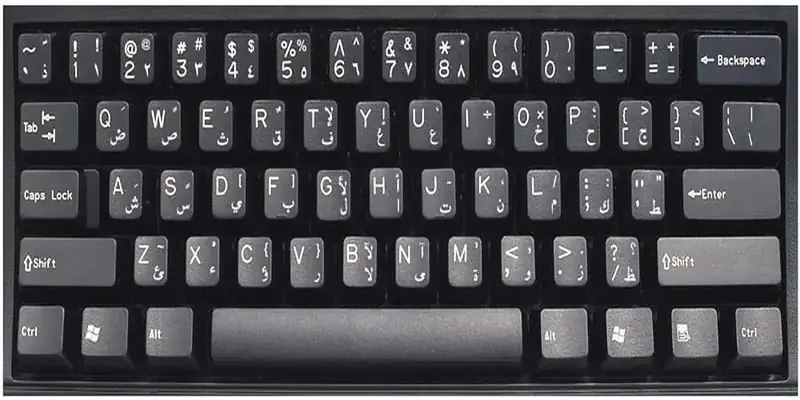
Why Use Our Online Arabic Keyboard?
Our Arabic keyboard online lets you type Arabic quickly without installing software or changing your device settings. Whether you are on a desktop, laptop, tablet, or phone, you can write Arabic straight from your browser. It is built for students, teachers, travelers, translators, and anyone who needs to write in Arabic without extra setup.
Unlike older tools that only let you click letters with a mouse, this keyboard also maps your real keys to the standard Arabic layout and offers English-to-Arabic transliteration, so you can type as fast as you think.
Three Ways to Type Arabic
This tool gives you every way to write Arabic in one place:
- On-screen keyboard: Click the Arabic letters with your mouse or finger.
- Your own keyboard: In Arabic Keyboard mode, your physical keys follow the standard Arabic (101) layout. Pressing H types ا, J types ت, and so on, even on a keyboard with no Arabic letters printed on it.
- Transliteration: Switch to transliteration and write the sound in English. Type salam for سلام, 7abibi for حبيبي, or 9alam for قلم. This Franco-Arabic style is popular across North Africa and the Middle East.
Type Arabic with Tashkeel
Tashkeel matters for correct pronunciation and meaning. Our keyboard includes the main Arabic diacritics such as Fatha, Damma, Kasra, Tanween, Shadda, and Sukun in a dedicated row. Type a letter, then tap the diacritic to add it. This is ideal for learners, teachers, and anyone writing educational or religious Arabic text.
Works on Windows, Mac, iPhone and Android
The keyboard is fully responsive. On a phone you can tap the on-screen keys or use transliteration; on a desktop you get the full Arabic layout, copy and save tools, and text-to-speech. It works in Chrome, Edge, Safari, Firefox, and other modern browsers.
Copy, Save, Translate, Listen and Search
Besides Arabic letters, Tashkeel, and Eastern Arabic numerals (٠ ١ ٢ ٣ ٤ ٥ ٦ ٧ ٨ ٩), you can copy your text in one click, save it as a file, translate it, listen to it with text-to-speech, and search it directly on Google, YouTube, or in an Arabic dictionary. Everything is processed privately in your browser — use Copy or Save as .txt to keep your text before you leave.
Tips for Typing Arabic Faster
If you are new to writing in Arabic, start in transliteration mode and type words the way they sound, then switch to the standard layout as you memorise the key positions. Use the diacritics row only when you need precise vowels, keep your sentences short, and rely on the copy button to move text into WhatsApp, email, or documents. When you finish, copy your text or save it as a file — the editor starts fresh on every visit. With a little practice, most people write here as quickly as they do in their own language, whether they are on a phone, tablet, or computer.
How We Compare to Other Arabic Keyboards
Most online keyboards do one thing and stop there. Many have no Tashkeel, no voice, only mouse-clicking, and an interface that was last updated years ago. We built this tool to fix every one of those gaps in a single, fast, mobile-first page.
| Feature | Our Arabic Keyboard | Typical online keyboards |
|---|---|---|
| Type with your own physical keyboard | Yes | Some only |
| English → Arabic transliteration (salam → سلام) | Yes | Rarely |
| Tashkeel / diacritics | Yes | Often missing |
| Text-to-speech (listen to your text) | Yes | No |
| One-click copy, save & translate | Yes | Limited |
| Dark mode | Yes | Rare |
| Private — text never sent to a server | Yes | Unclear |
| Mobile-first, modern design | Yes | Often dated |
| No install, no sign-up | Yes | Varies |
Useful Arabic Language Resources
To improve your Arabic writing and pronunciation, you can use trusted resources alongside this keyboard. Learn more about the Arabic alphabet, check meanings with Google Translate, and read an overview of the Arabic language on Britannica.
- Unicode: Arabic mark rendering – How Arabic letters join and how marks stack above and below them.
- Google Translate – Translate Arabic text quickly.
- Britannica: Arabic language – A trusted overview of the Arabic language.
- Unicode Arabic Presentation Forms-A – The joined letter shapes behind what you copy.
Arabic Keyboard for Your Device
Set up an Arabic keyboard on the device you actually type on:
The Arabic keyboard layout, explained key by key
The layout you see above is not improvised. It is ASMO 449, the Arabic keyboard standard, and it is the same arrangement Windows, macOS and every physical Arabic keyboard use. Learn it once and it works everywhere.
The home row is where to start, because it carries the letters you will type most:
| Key | A | S | D | F | G | H | J | K | L |
|---|---|---|---|---|---|---|---|---|---|
| Letter | ش | س | ي | ب | ل | ا | ت | ن | م |
| Name | shin | sin | ya | ba | lam | alif | ta | nun | mim |
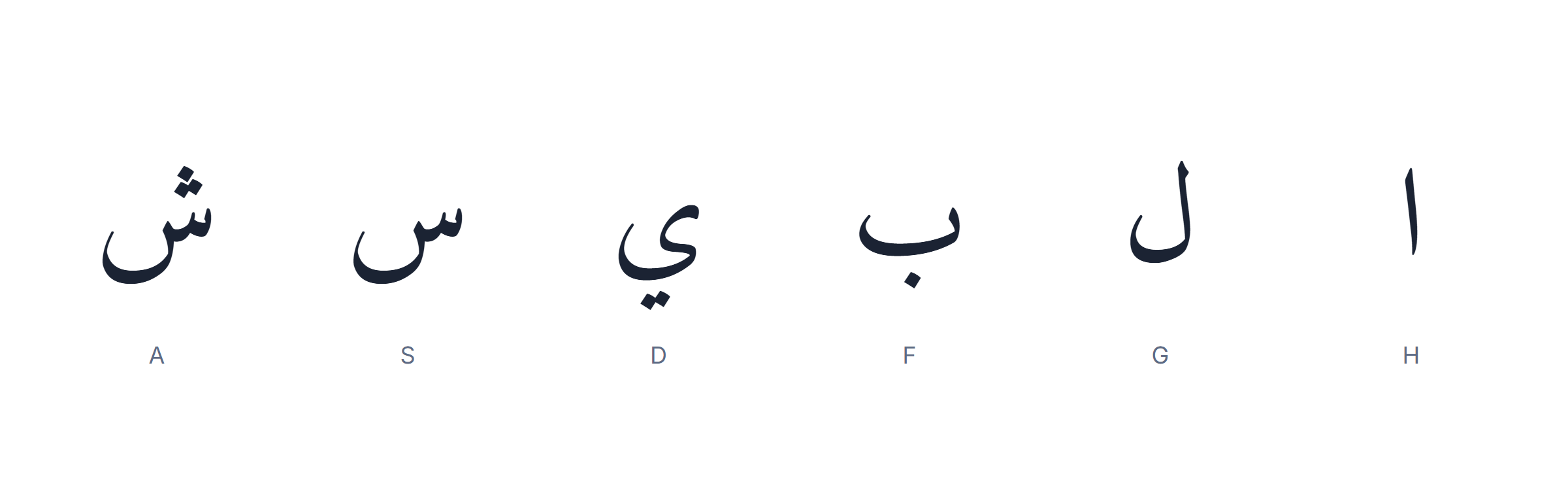
Two design decisions explain the rest of the board. First, related letters sit together. ض and ص are neighbours on Q and W; ث and ق follow on E and R. If two letters look alike on paper, they are usually close on the Arabic keyboard too.
Second, frequency beats logic. Alif ا, the most common letter in Arabic, sits on H — dead centre, under the strongest finger. Rare letters like ظ and ذ are pushed to the edges. The alphabet order was sacrificed on purpose.
Arabic has more characters than a keyboard has keys, so the shift layer carries the rest: the hamza forms, the Arabic punctuation, and the harakat. That is why an Arabic keyboard feels crowded at first and stops feeling crowded once you know that everything unusual lives on shift.
You do not have to memorise any of this to use the Arabic keyboard on this page — the letters are printed on the keys in front of you. But if you plan to add the Arabic layout to your own computer later, this is the arrangement you will meet, and clicking here first is the cheapest way to learn it.
All 28 letters and the key each one sits on
This is the whole alphabet against the English key that produces it on a standard Arabic keyboard. Keep it open in a tab while you type and you will stop needing it within a week.
| Letter | Name | Key | Letter | Name | Key |
|---|---|---|---|---|---|
| ا | alif | H | ض | dad | Q |
| ب | ba | F | ط | ta (emphatic) | ‘ |
| ت | ta | J | ظ | za (emphatic) | / |
| ث | tha | E | ع | ayn | U |
| ج | jim | [ | غ | ghayn | Y |
| ح | ha (deep) | P | ف | fa | T |
| خ | kha | O | ق | qaf | R |
| د | dal | ] | ك | kaf | ; |
| ذ | dhal | ` | ل | lam | G |
| ر | ra | V | م | mim | L |
| ز | zay | . | ن | nun | K |
| س | sin | S | ه | ha | I |
| ش | shin | A | و | waw | , |
| ص | sad | W | ي | ya | D |
Four groups are worth noticing, because they explain most beginner confusion.
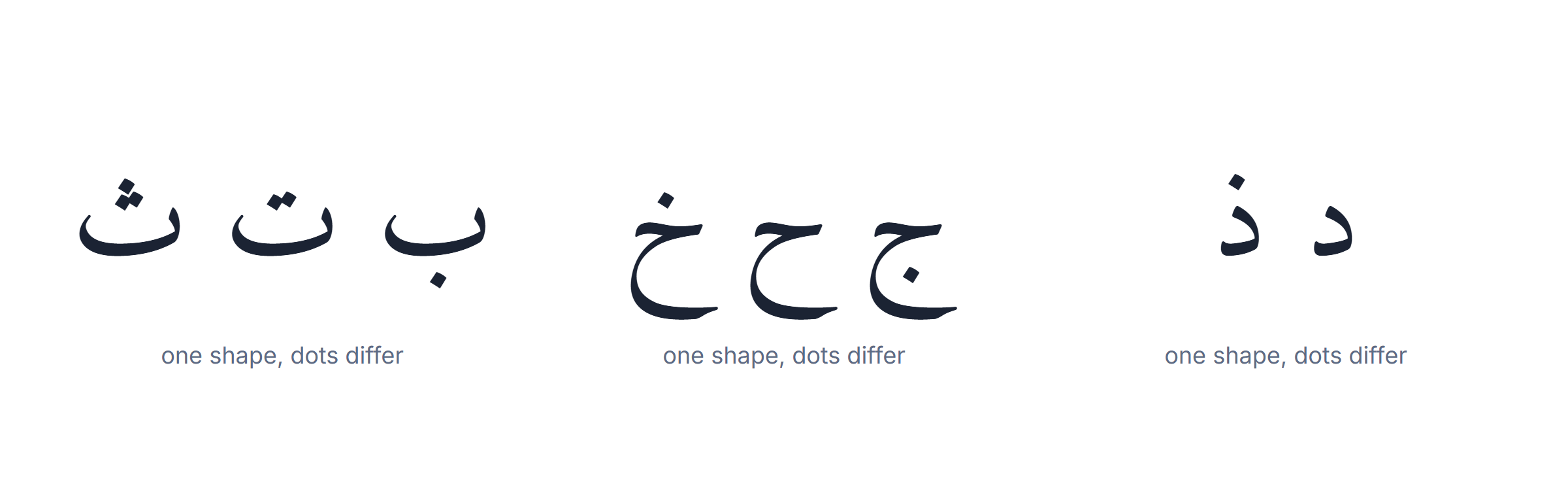
The dot families. ب ت ث share one shape and differ only in dots, as do ج ح خ, د ذ and ر ز. Eleven letters, four shapes. Learning them as families is far faster than learning them in alphabetical order.
The emphatics. ص ض ط ظ are the four that have no English equivalent at all. They are the reason Arabic transliteration needs extra symbols, and the reason a name can be spelled several ways in English.
The six non-connectors. ا د ذ ر ز و join to the letter before them but never to the letter after. A word containing one looks broken in the middle. It is not — that is correct Arabic, and the Arabic keyboard is behaving exactly as it should.
The hamza carriers. أ إ ؤ ئ ء all sound alike and are spelled differently depending on the surrounding vowels. They live on the shift layer of the Arabic keyboard, and they are the single most common spelling mistake for learners.
Arabic numbers, dates and currency
Arabic has two sets of digits in daily use, and which one is correct depends entirely on where your reader is.
| 0 | 1 | 2 | 3 | 4 | 5 | 6 | 7 | 8 | 9 | |
|---|---|---|---|---|---|---|---|---|---|---|
| Western | 0 | 1 | 2 | 3 | 4 | 5 | 6 | 7 | 8 | 9 |
| Eastern | ٠ | ١ | ٢ | ٣ | ٤ | ٥ | ٦ | ٧ | ٨ | ٩ |
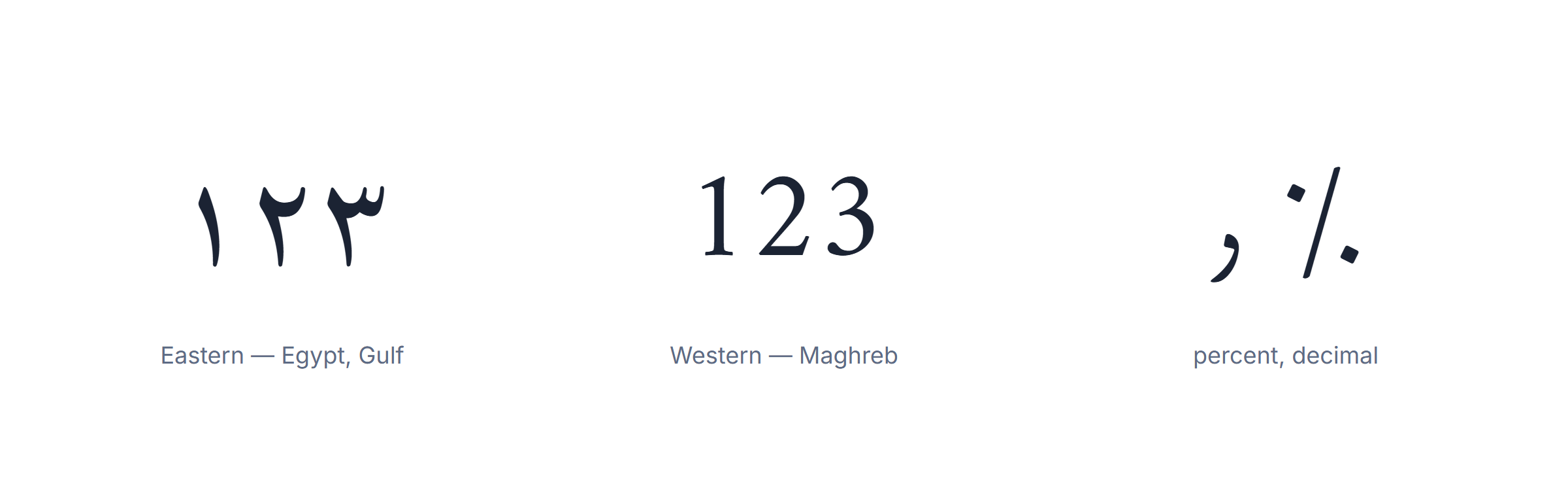
Where each is used. Egypt, Sudan, Yemen and the Gulf states normally write the Eastern forms. Morocco, Algeria, Tunisia and Libya use the Western digits — the same 0-9 you are reading now. Writing ١٢٣ to a Moroccan reader is not wrong, but it is unusual enough to look foreign.
Numbers do not flip. This surprises everyone. Arabic runs right to left, but a number is still read left to right: 2026 is written 2026 and read “two thousand twenty-six”, not backwards. If a number appears reversed on your screen, the display is at fault, not your Arabic keyboard, and the text underneath is correct.
The separators are different characters. Arabic has its own decimal mark ٫, thousands mark ٬ and percent sign ٪. They look like a comma, an apostrophe and a percent sign but they are distinct code points, and mixing them with the Latin ones inside one document is the usual cause of numbers that will not align in a table.
Dates. Two calendars circulate side by side: the Gregorian, marked م, and the Hijri, marked ه. Official documents in Saudi Arabia often carry both. If you are filling a form, copy the calendar the form already uses rather than converting.
All of these characters are on the Arabic keyboard above, most of them on the shift layer next to the punctuation.
Arabic punctuation and the characters English has no name for
Arabic punctuation looks familiar and is not. Four marks in particular are different characters, not styled versions of the English ones, and using the English form makes a sentence sit visually the wrong way round.
| Arabic | English | Note |
|---|---|---|
| ، | , | comma — curves the other way |
| ؛ | ; | semicolon — mirrored |
| ؟ | ? | question mark — mirrored |
| ٪ | % | percent — distinct code point |
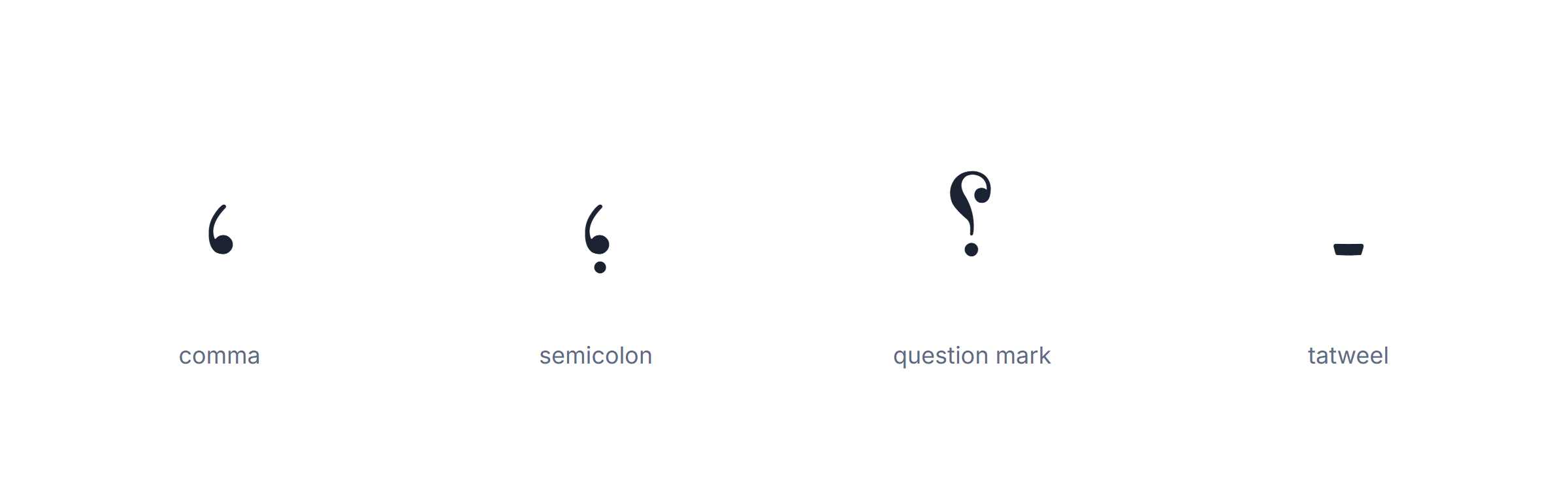
Then there are three characters that have no English counterpart at all.
Tatweel ـ, also called kashida, stretches the connecting stroke between two letters. It is used to justify a line or to decorate a heading — مــرحبا is the same word as مرحبا. ⚠️ It changes nothing to a human and everything to a search engine: a word padded with tatweel will not match a search for the plain word. Never use it in a name, a heading you want found, or a form field.
Lam-alef لا is not optional decoration but a required ligature: ل followed by ا must be drawn as one shape. Every Arabic keyboard produces it automatically when you type the two letters in order, so you never type it directly.
The Allah ligature ﷲ and its relatives are single code points that render an entire word. They exist for typographic reasons and are best left alone in ordinary text — type the letters and let the font do the work.
One habit saves most punctuation trouble: finish the Arabic sentence, then add the mark from the Arabic keyboard rather than from your usual layout. Mixing the two inside one paragraph is what produces a question mark floating at the wrong end of the line.
Fonts that render Arabic properly — and the ones that break it
Almost every “the letters are not joining” report comes down to one thing: the font in the program you pasted into cannot draw Arabic. The text produced by the Arabic keyboard was correct; the destination could not display it.
Arabic is a connected script. A font has to carry four shapes for most letters plus the required ligatures, and a font that carries none of that will either show boxes or fall back to a substitute that sets the letters apart like beads on a string.
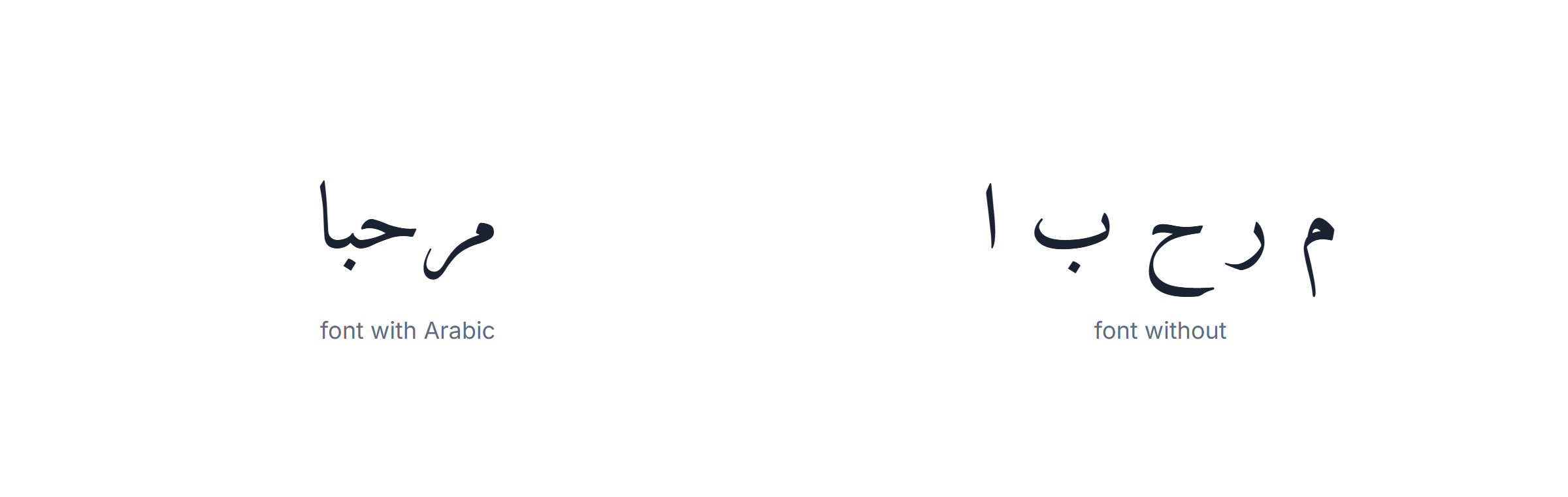
Safe choices, in order. Noto Naskh Arabic and Amiri are free, complete and designed for body text. Cairo and Noto Sans Arabic are the modern sans-serif equivalents. On Windows, Tahoma, Segoe UI and Arial already carry Arabic and need no installation, which makes them the pragmatic answer for a document you are sending to someone else.
Where it goes wrong. Design software is the usual culprit: Photoshop, Illustrator and InDesign set Arabic letter-by-letter until you enable their Middle Eastern text options, and no font choice will fix it before you do. Decorative Latin display fonts are the second cause — they have no Arabic glyphs at all, so the program silently substitutes.
PDF has its own trap. If you export without embedding the font, the file is correct on your machine and broken on the reader’s, because their viewer picks a substitute. Always embed the font when a document containing Arabic leaves your computer.
A thirty-second test before you commit to a font: type مرحبا on the Arabic keyboard above, paste it in, and look at whether the letters touch. If they do, the font is fine for everything else you will write.
How fast can you type Arabic, and how to get faster
Clicking the keys on screen is fine for a name or a message. If you are writing paragraphs, you will want to touch-type, and Arabic has two quirks that change how that goes.
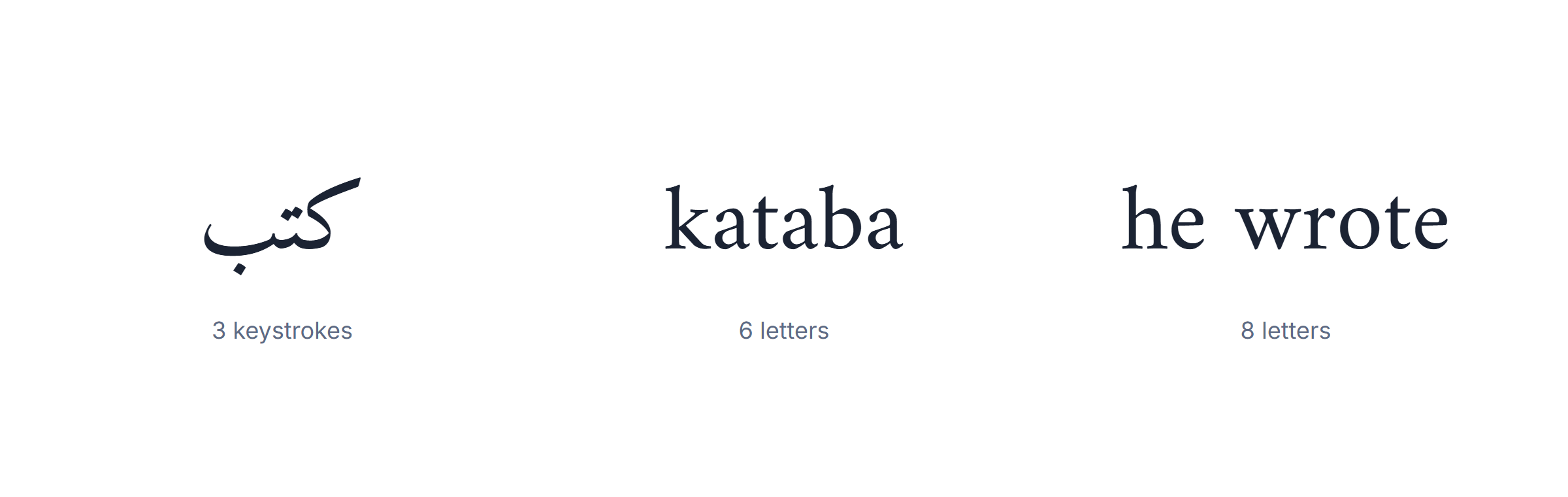
Arabic words are short in letters. Short vowels are usually not written, so a three-syllable word is often three or four keystrokes. That works in your favour and it means keystroke counts from English typing tests do not transfer.
But the shift layer is busy. The hamza forms, the punctuation and the harakat all live on shift, so real Arabic text uses the shift key far more than English does. Most of the gap between a beginner and a fluent typist on an Arabic keyboard is shift-layer hesitation, not letter hunting.
What actually works, in the order it works:
1. The home row alone, for a week. Nine letters — ش س ي ب ل ا ت ن م — appear in a large share of ordinary words. Do not add rows until you can type those without looking.
2. Real words, never letter drills. Type the twenty words you would actually write: greetings, your name, your city, the people you message. Muscle memory attaches to words, not to alphabets.
3. Add the shift layer deliberately. Once the letters are automatic, spend a session on nothing but hamza and punctuation. It feels like a waste of time and it is where the speed is.
4. Measure, occasionally. Our Arabic typing test gives you a number to compare against yourself. Compare against last week, not against anyone else.
Expect a usable speed — enough to write a message without suffering — after three or four weeks of short daily sessions. Expect your English speed to take much longer, exactly as it did the first time. Until then the Arabic keyboard on this page is faster than either, because nothing has to be memorised to use it.
Right to left: what happens when Arabic and English share a line
This is the part that makes people think their Arabic keyboard is broken, and it almost never is. Understanding it takes two minutes and saves hours.
Text has two separate properties: the order the characters are stored in and the order they are drawn on screen. Arabic is stored in the order you typed it, first letter first, exactly like English. Only the drawing runs right to left. Nothing about your file is reversed.

The complication starts when a line contains both. Every browser, phone and word processor runs the Unicode bidirectional algorithm, which splits the line into runs and lays each one out in its own direction. An English brand name inside an Arabic sentence stays left to right. So does a number. So does a URL. The Arabic around them still flows right to left. That is correct behaviour, not a fault.
What the algorithm cannot decide by itself is which direction the paragraph as a whole should take. It guesses from the first strong character. Start a line with an English word and the whole paragraph is treated as left to right, which pushes your Arabic punctuation to the wrong end. That single rule explains most of the “my text is backwards” reports.
How to fix it, per program. In Word, put the cursor in the paragraph and press Ctrl + Shift + Right; the opposite shortcut sets it back. In Excel, set the cell alignment to right-to-left rather than reformatting the text. On a web page, add dir="rtl" to the element — one attribute, not a stylesheet. In a plain text box that offers nothing, start the line with an Arabic word and the guess resolves correctly on its own.
The one thing never to do is retype the sentence backwards to make it look right. It will display correctly on your screen and be genuinely reversed underneath — unreadable to an Arabic reader, unsearchable, and impossible to fix automatically later. If the letters came out of the Arabic keyboard in the right order, they are in the right order.
A quick way to tell display trouble from real trouble: copy the suspect text back into the Arabic keyboard box on this page. If it reads correctly here, the storage is fine and only the other program’s direction setting is wrong.
Arabic keyboard layouts compared
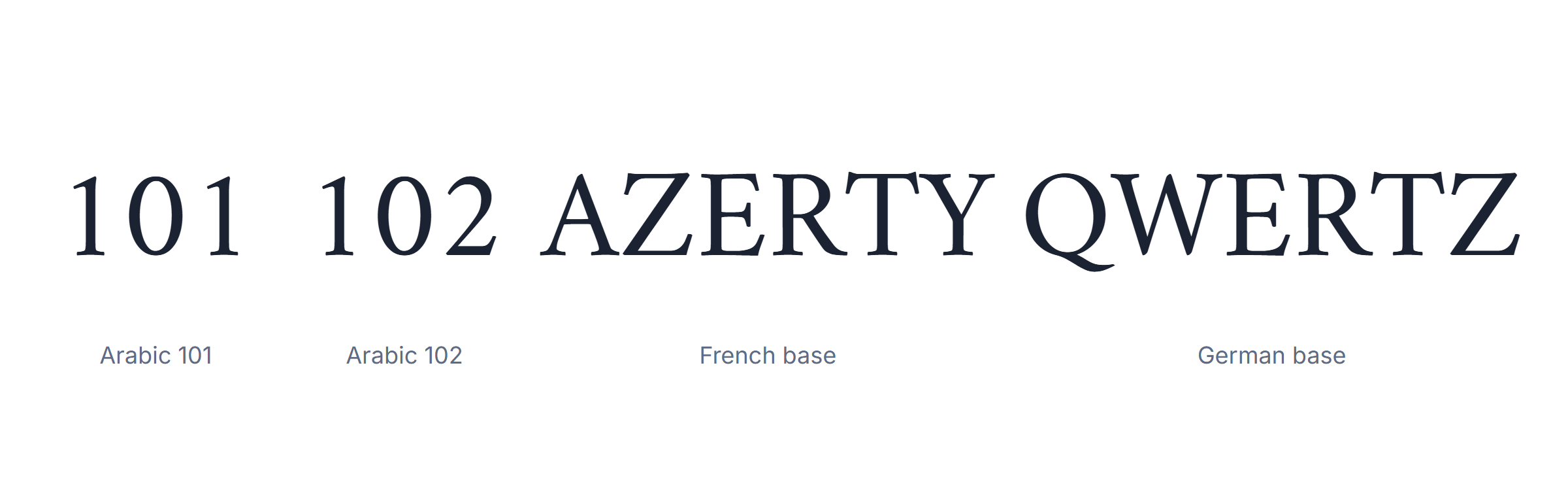
There is no single Arabic keyboard layout. There are four you will meet, and the difference between them is not where the Arabic letters sit — that is almost identical — but which Latin legends are printed on the same keys.
| Layout | Latin base | Where it is standard | Arabic positions |
|---|---|---|---|
| Arabic 101 | QWERTY | The default nearly everywhere | Reference |
| Arabic 102 | QWERTY, extra key | Europe, 102-key hardware | Same as 101 |
| Arabic AZERTY | AZERTY | France, Belgium, Maghreb | Same as 101 |
| Arabic QWERTZ | QWERTZ | Germany, Austria, Switzerland | Same as 101 |
Why this matters less than people think
Because the Arabic positions are shared, muscle memory built on one layout transfers to all of them. What does not transfer is the punctuation, which sits on different keys depending on the Latin base underneath.
What our online Arabic keyboard uses
The visible keys follow Arabic 101, the layout printed on keyboards sold across the Arab world, so anything you learn here matches a physical keyboard you buy later.
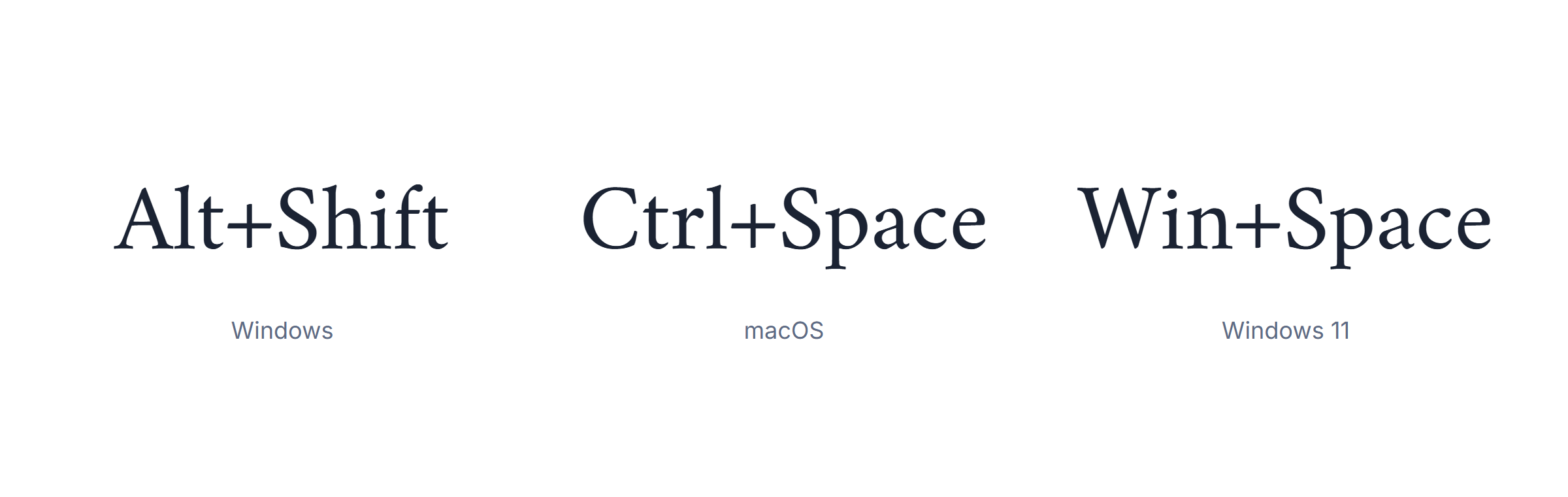
Switching between Arabic and English while you type
If you install a system layout rather than using the online Arabic keyboard, the whole experience comes down to one shortcut.
| System | Switch shortcut | Cycle through all |
|---|---|---|
| Windows 10 | Alt + Shift | Win + Space |
| Windows 11 | Win + Space | Alt + Shift |
| macOS | Ctrl + Space | Ctrl + Opt + Space |
| Linux, GNOME | Super + Space | Same |
| iOS | Globe key | Hold the globe key |
| Android | Globe or space swipe | Hold the space bar |
The part people miss
- The shortcut changes the input language, not the text direction. A document still needs its own right-to-left setting.
- Windows remembers the layout per application by default, which is why the language seems to change on its own when you alt-tab.
- On macOS the Arabic layout has to be added in Settings before the shortcut does anything.
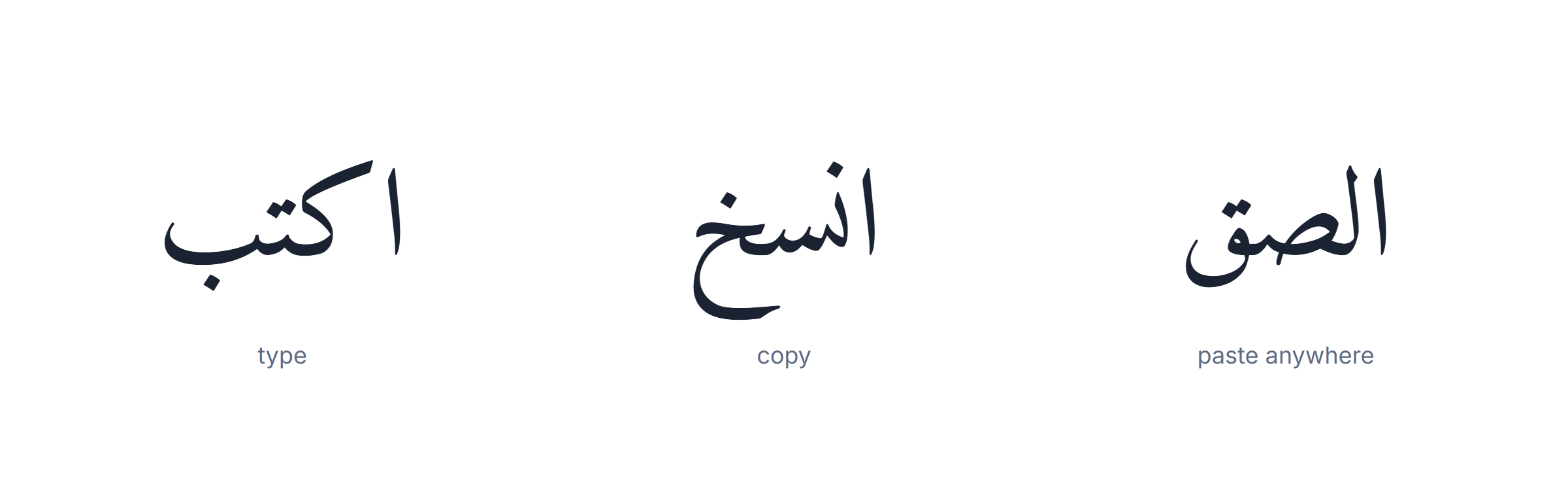
Copying Arabic out of the keyboard without breaking it
Arabic text copied from this Arabic keyboard online is ordinary Unicode and pastes cleanly into almost everything. When it does break, it breaks in one of three ways, and none of them is caused by the copying.
| What you see | Cause | Fix |
|---|---|---|
| Letters detached | The destination is not shaping Arabic | Use an app that supports Arabic, or change the font |
| Empty boxes | No Arabic glyphs in the font | Switch to Noto Naskh Arabic or Arial |
| Question mark at the wrong end | Text direction not set | Set the paragraph to right-to-left |
| Text reversed | Direction, never the characters | Same |
| Tashkeel missing | The destination stripped combining marks | Paste as plain text into a Unicode-aware editor |
Three steps, no installation
- Type in the Arabic keyboard above.
- Press Copy, or select and use Ctrl/Cmd + C.
- Paste wherever you need it — a message, a form, a document, a search box.
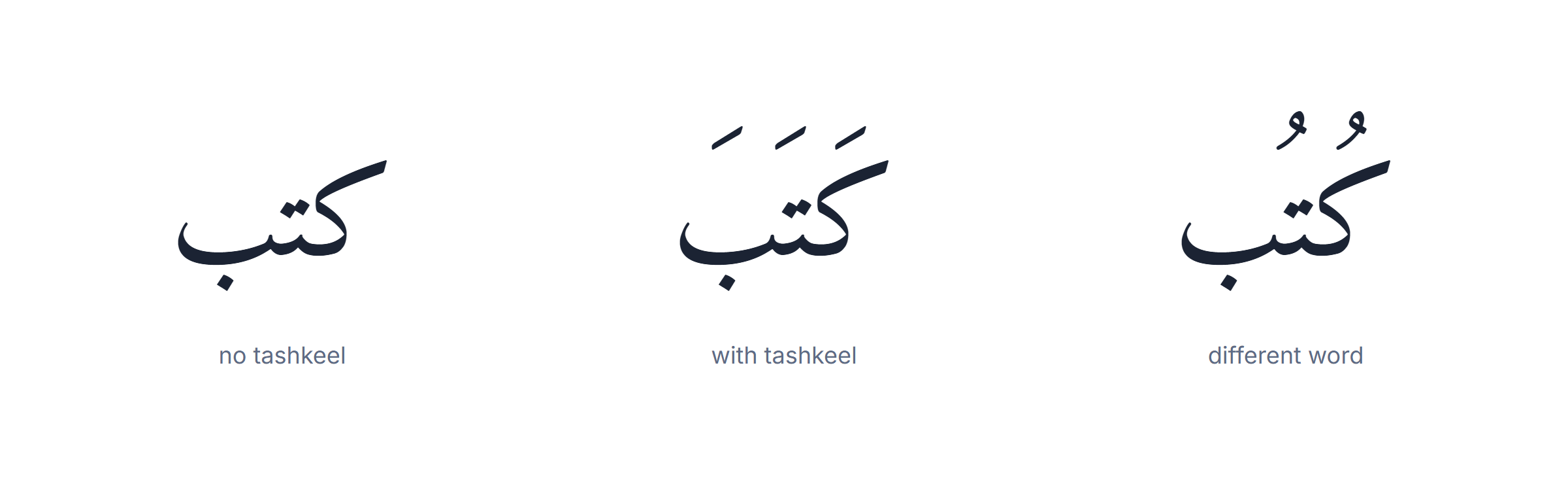
Typing Arabic with tashkeel
Tashkeel — the short-vowel marks — change what a word says, not how it looks. The three consonants k-t-b are six different words depending on which marks you add.
| Mark | Name | Sound | Where it sits |
|---|---|---|---|
| َ | fatha | short a | Above |
| ِ | kasra | short i | Below |
| ُ | damma | short u | Above |
| ْ | sukun | no vowel | Above |
| ّ | shadda | doubles the letter | Above |
| ً | tanwin fath | -an | Above |
When you need them and when you do not
- Needed — teaching material, children’s books, Quranic text, poetry, any word whose reading is genuinely ambiguous.
- Not needed — messages, forms, search, ordinary prose. Native readers supply the vowels from context and find full tashkeel slightly childish.
The harakat guide covers each mark in detail, and the keyboard above has them on their own row.
Every tool and guide on this site
Type and convert
- Arabic transliteration — type in Latin letters, get Arabic.
- Arabic harakat — add the short vowels.
- Arabic calligraphy generator — text rendered in classical styles.
- Arabic typing test — measure your speed.
- All tools — the full index.
Learn the script
- Arabic alphabet pronunciation
- Arabic punctuation
- Arabic grammar rules
- Arabic fonts
- Arabic dialects
- Why Arabic is written right to left
- Arabic calligraphy styles
- Arabic quotes and proverbs
Words and phrases
- Common Arabic phrases
- Arabic greetings
- Beautiful Arabic words
- How to learn Arabic
- Is Arabic hard to learn?
Compare the languages that share the script
In other languages
- Clavier arabe — French
- Arabische Tastatur — German
- Arapça Klavye — Turkish
- Clavier darija — Moroccan
Sources and standards
Everything on this page about characters, layouts and text direction comes from the primary specifications rather than from other keyboard sites.
- Unicode Arabic block (U+0600) — the character set behind every key above.
- Unicode bidirectional algorithm (UAX #9) — why punctuation moves.
- W3C: scripts and writing direction.
- W3C Arabic layout requirements.
- Microsoft: the Arabic 101 keyboard layout.
- Apple: adding an input source on macOS.
- The Arabic 102 keyboard layout — the second standard Arabic layout.
- MDN: the dir attribute.
- Ethnologue: Standard Arabic — speaker numbers.
Setting up an Arabic keyboard on your own device
The keyboard above needs nothing installed. If you would rather add a system layout so you can type Arabic everywhere, each platform has its own route — and each one has its own step people get stuck on.
| Device | Where the setting lives | The step people miss | Guide |
|---|---|---|---|
| Windows | Settings, Time & language, Language | Add the keyboard, not just the display language | Windows |
| macOS | Settings, Keyboard, Input Sources | The shortcut does nothing until Arabic is added | macOS |
| iPhone, iPad | Settings, General, Keyboard, Keyboards | Choose the right variant for your region | iPhone |
| Android | Settings, System, Languages, On-screen keyboard | The layout is per keyboard app, not per phone | Android |
| Chromebook | Settings, Advanced, Languages and inputs | Enable the input method after adding it | Chromebook |
| Linux | Region & Language, Input Sources | Pick Arabic, then a variant | Linux |
Typing Arabic inside specific applications
Some applications need more than a system layout — a direction setting, a font, or both.
- How to type Arabic in Word — including the right-to-left paragraph button people never find.
- How to type Arabic in Google Docs — the text-direction setting is under Format.
- How to type Arabic on WhatsApp — and why the message looks fine to you and broken to them.
- How to type hamza — the one letter with six written forms.
- Embed this Arabic keyboard — put it on your own page.
Regional French pages
If you type Arabic from a French-language interface, these cover the local setups:
- Clavier arabe Maroc
- Clavier arabe Algérie
- Clavier arabe Tunisie
- Clavier arabe iPhone
- Clavier arabe WhatsApp
About keyboards themselves
- How does a keyboard work?
- Which keyboard switches are the quietest?
- Are keyboard covers bad for a MacBook Air?
- What keyboard does Peterbot use?
Where this Arabic keyboard works
It is a web page, so it runs anywhere a modern browser does. The only differences worth knowing are around copying.
| Browser | Typing | Copy button | Note |
|---|---|---|---|
| Chrome, Edge | Full | Yes | Nothing to configure |
| Firefox | Full | Yes | Nothing to configure |
| Safari, macOS | Full | Yes | Nothing to configure |
| Safari, iOS | Full | Yes | Copy may ask for permission once |
| Samsung Internet | Full | Yes | Nothing to configure |
| Older browsers | Full | Select and copy manually | The clipboard API may be missing |
What it never does
- It does not send what you type anywhere. The text stays in the browser.
- It does not need an account, an extension or a download.
- It does not change your system keyboard settings.
The 28 letters, and where each one sits
The Arabic alphabet has 28 letters, all consonants. Six of them never join to the letter that follows, which is why Arabic words sometimes appear to have gaps in the middle.
| Letter | Name | Sound | Joins forward? | Latin key |
|---|---|---|---|---|
| ا | alif | long a | No | H |
| ب | ba | b | Yes | F |
| ت | ta | t | Yes | J |
| ث | tha | th as in think | Yes | E |
| ج | jim | j, or hard g in Egypt | Yes | [ |
| ح | ha | hard h | Yes | P |
| خ | kha | ch as in loch | Yes | O |
| د | dal | d | No | ] |
| ذ | dhal | th as in this | No | ` |
| ر | ra | rolled r | No | V |
| ز | zay | z | No | . |
| س | sin | s | Yes | S |
| ش | shin | sh | Yes | A |
| ص | sad | emphatic s | Yes | W |
| ض | dad | emphatic d | Yes | Q |
| ط | ta | emphatic t | Yes | ‘ |
| ظ | za | emphatic z | Yes | / |
| ع | ayn | a throat sound | Yes | U |
| غ | ghayn | a French r | Yes | Y |
| ف | fa | f | Yes | T |
| ق | qaf | a deep k | Yes | R |
| ك | kaf | k | Yes | ; |
| ل | lam | l | Yes | G |
| م | mim | m | Yes | L |
| ن | nun | n | Yes | K |
| ه | ha | h | Yes | I |
| و | waw | w, long u | No | , |
| ي | ya | y, long i | Yes | D |
The six that never join forward
alif, dal, dhal, ra, zay, waw. After one of these the next letter starts a fresh shape, which produces the visible break inside a word. It is correct, not a rendering fault — unlike the detached letters covered above, where every letter stands alone.
Full detail on each sound is in the Arabic alphabet pronunciation guide.
Frequently Asked Questions
How do I use this free online keyboard?
Type in three ways: click the on-screen letters, press your own keys (mapped to the Arabic layout), or switch to transliteration and type the sound in English. Then copy, save, translate, or listen to your text.
Can I type Arabic with my own physical keyboard?
Yes. In keyboard mode your keys follow the standard Arabic (101) layout, so you can touch-type Arabic even on a keyboard with no Arabic letters printed on it.
What is transliteration mode?
Transliteration lets you write Arabic using English letters and Franco-Arabic numbers. Type 3arabi, 7abibi, or 9alam and it becomes العربية, حبيبي, and قلم.
Does this keyboard support Tashkeel?
Yes. Add Fatha, Damma, Kasra, Tanween, Shadda, and Sukun from the diacritics row after typing a letter.
Do I need to install software?
No. It is browser-based and works instantly on PC, Mac, iPhone, and Android without installation.
Need more help? Visit our contact page or read our privacy policy.